Smithereens — Every Pot, Crate, Rock and Bush Breaks the Way Its Material Would, for RPG Maker MZ
A downloadable asset pack
Your player hits a pot with a sword and it vanishes.
In RPG Maker MZ a breakable object is an event that erases itself. There is no debris, nothing flies, and a clay pot, an oak crate and a boulder all disappear the same way. The usual fix is to draw break animations by hand, one per object, per size, per style, and to place them one at a time.
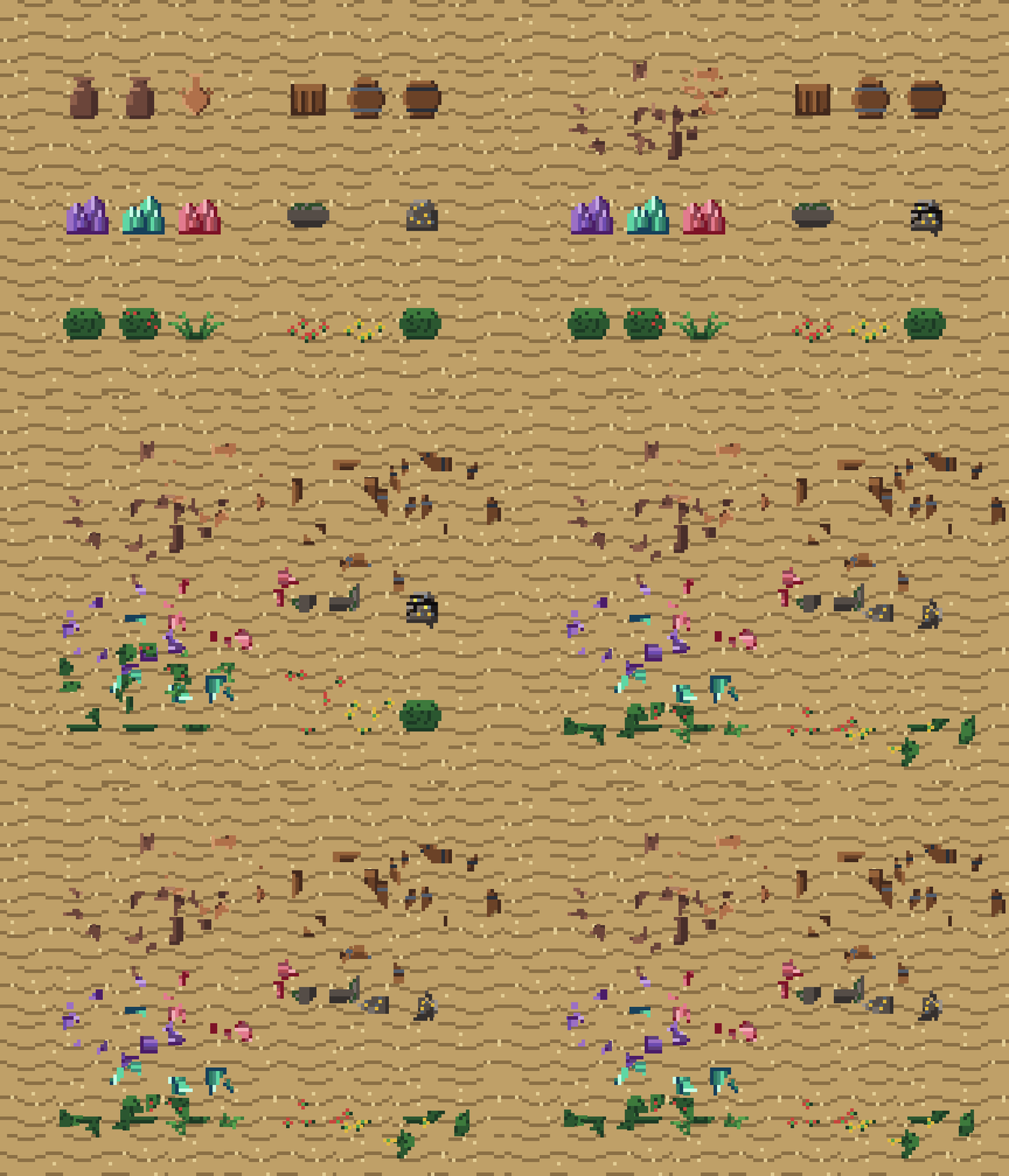
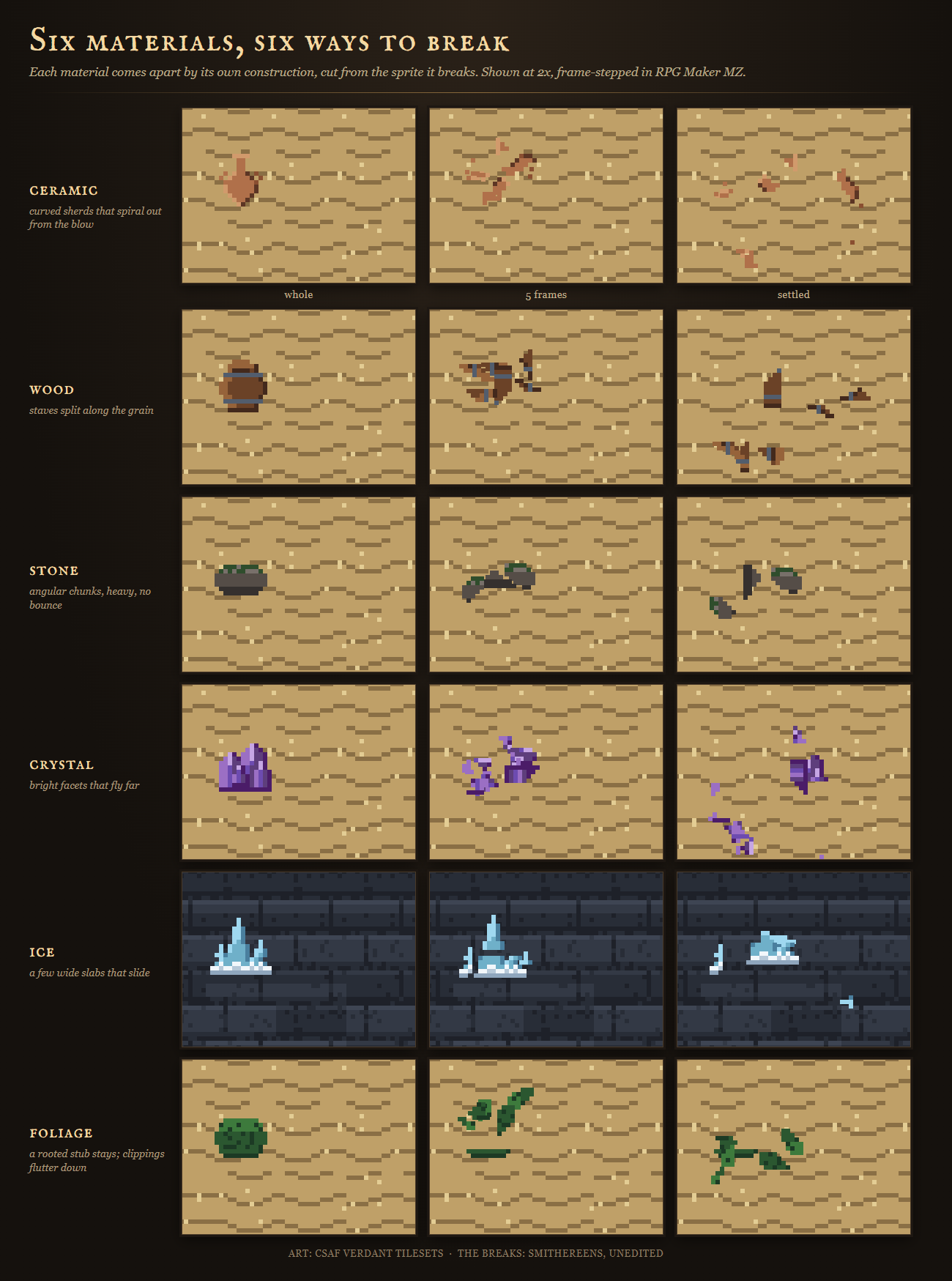
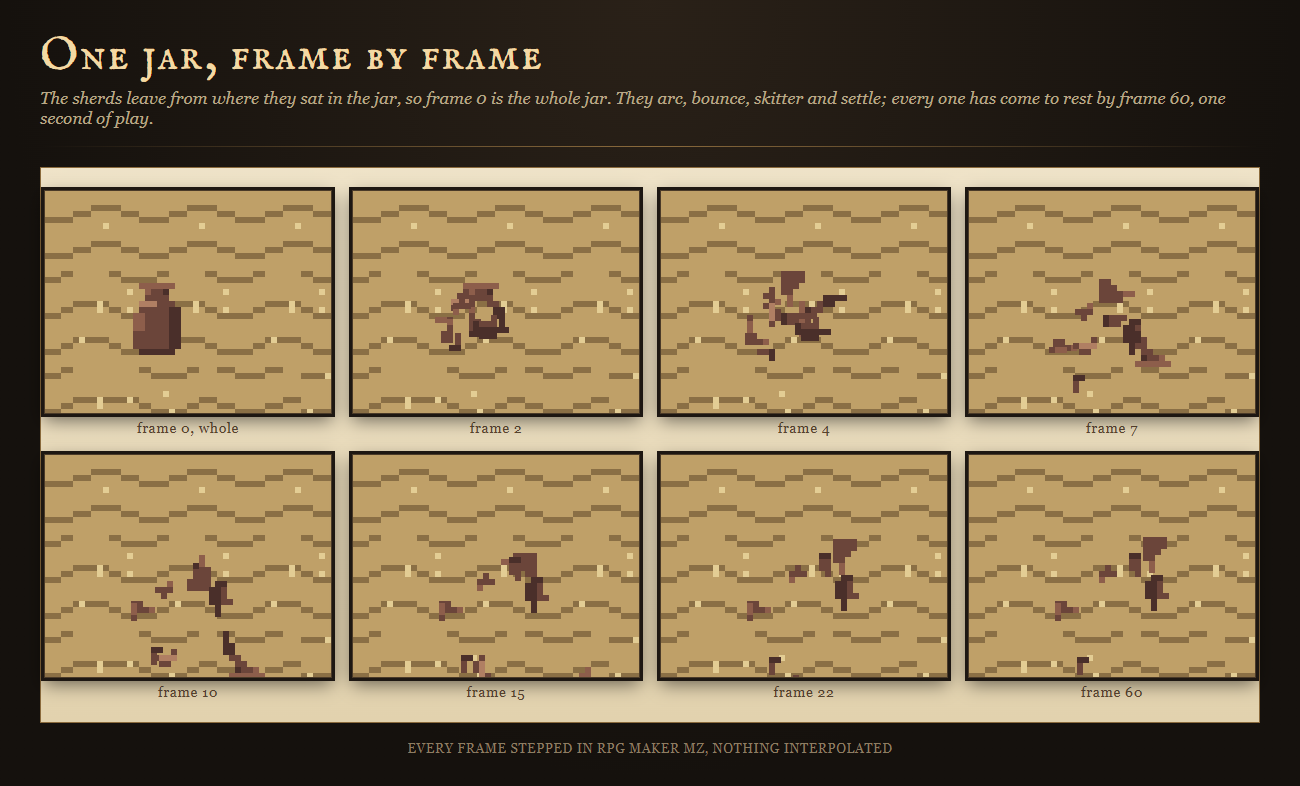
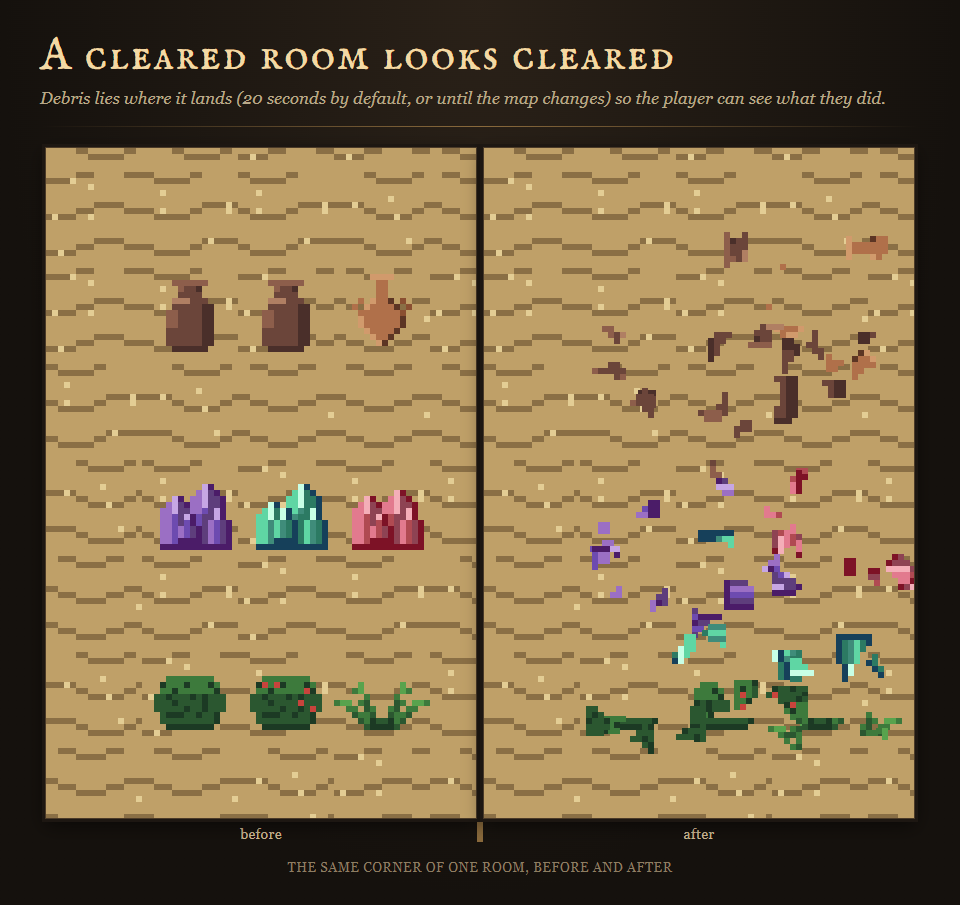
Smithereens breaks the object you already have, cut from its own pixels, the way its material would break. A jar bursts into curved sherds that spiral out from the blow and skitter. A crate splits into staves along the grain. A rock cracks into heavy chunks that hop once and stay. A crystal fans apart into bright facets. An ice block splits into a few wide slabs that slide. A bush is cut down to a rooted stub while its clippings flutter away. Every fragment is cut from the exact frame your event is showing, so it matches your art in any style, at any size, including art you have not drawn yet. No fragment images, no animations to draw, one note tag.
⚠️ Compatibility — the question you actually have
Tested against RPG Maker MZ with the stock scripts unmodified, verified by running the plugin in the real engine rather than only in tests.
Plugin Manager order:
SmithereensCore.js— [CSAF] Smithereens core: materials and seeded fracture maps. Install with Smithereens.js.SmithereensCut.js— [CSAF] Smithereens cut: fragments cut from your own graphics. Install with Smithereens.js.Smithereens.js— [CSAF] Smithereens: pots, crates, rocks, crystals, ice and bushes break the way their material would, cut from your own art.
This order reads sensibly in the list and nothing depends on it. Every file resolves its siblings the first time a map loads, so Smithereens works in whatever order the Plugin Manager gives you, including the alphabetical order you get by dragging the folder in, which puts the entry file Smithereens.js first. That is tested: the engine probes, the frame-cost gate and a fresh install of the shipped zip into a blank MZ project all load the three files alphabetically. Smithereens.js is the only file that touches RPG Maker; the other two are the fracture and physics, and the pixel cutter, and neither knows the engine exists.
Core methods extended — 4 by saved-original prototype extension, none replaced: Spriteset_Map.prototype.createLowerLayer, Spriteset_Map.prototype.update, Sprite_Character.prototype.updatePosition, Game_Map.prototype.setup.
Because nothing is clobbered, Smithereens co-exists with other plugins that patch the same seams, including large suites.
6 materials that break differently, and it knows your stock art already
- ceramic pots, jars, urns: curved sherds, spiralling out of the strike, bouncing.
- wood crates, barrels, stumps: staves split along the grain, each with a slanted tip, tumbling in quarter turns.
- stone rocks, boulders, ore: angular chunks, more of them on bigger rocks, heavy and low.
- crystal crystals, gems, glass: facets fanning from the blow, fast and far.
- ice: a few wide slabs split by one straight crack, sliding a long way on landing.
- foliage bushes, grass, flowers: the stub stays rooted, the top becomes clippings that flutter.
- generic: anything else, as plain pixel chunks.
Write <smash> in an event's note and the material is found for you: your own note tag first, then your terrain tags and regions, then a built-in table of 181 of RPG Maker MZ's own stock breakables across its object sheets and tile sheets, so a brand new project's pots, crates, barrels, rocks, crystals and bushes already break correctly. That table holds sheet names and index numbers only and ships no artwork. For your own art, name the material in the tag. Smithereens never guesses a material from colours, because a crate bursting into pottery sherds looks worse than a neutral break.
Gathering nodes that visibly wear down
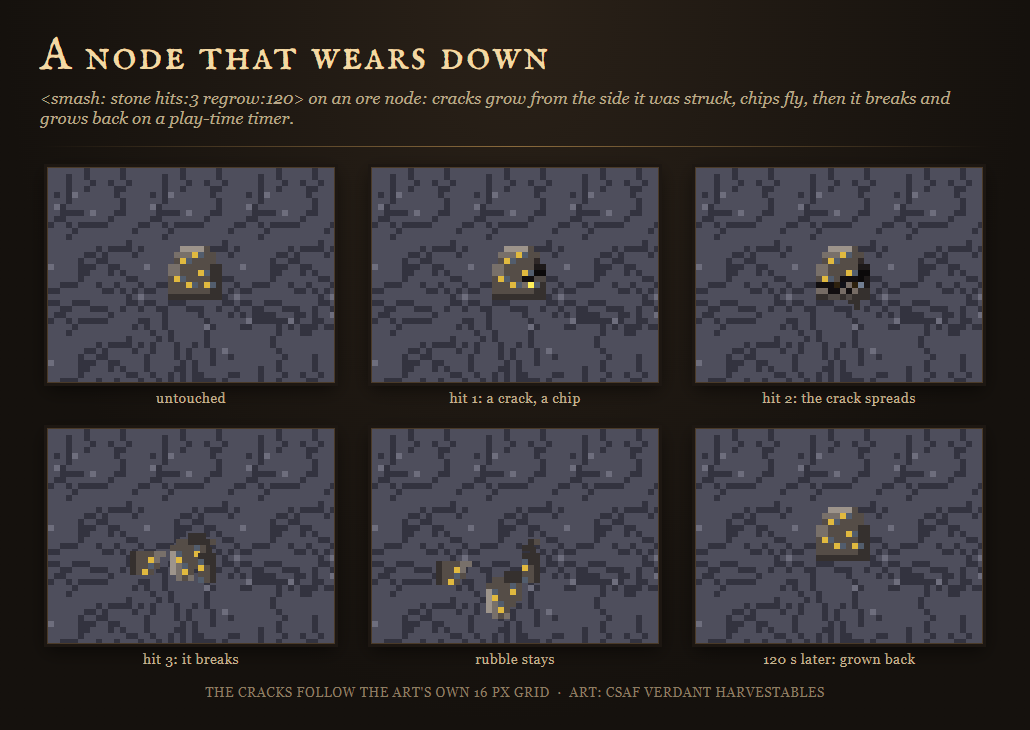
<smash: stone hits:3 regrow:120> turns an object into a node. Each strike before the last draws a crack network that starts on the side the blow landed and spreads further with every hit, older cracks opening wider with a lit edge catching the light; it knocks a chip off the struck side and leaves a darker scar where the chip came from; and it shakes the object for a moment. The last hit breaks it, and it grows back after the seconds you name, in play time, surviving leaving the map, saving and loading. The cracks are drawn from the object's own colours, along the art's own pixel grid.
Pixel art is cut on its own grid
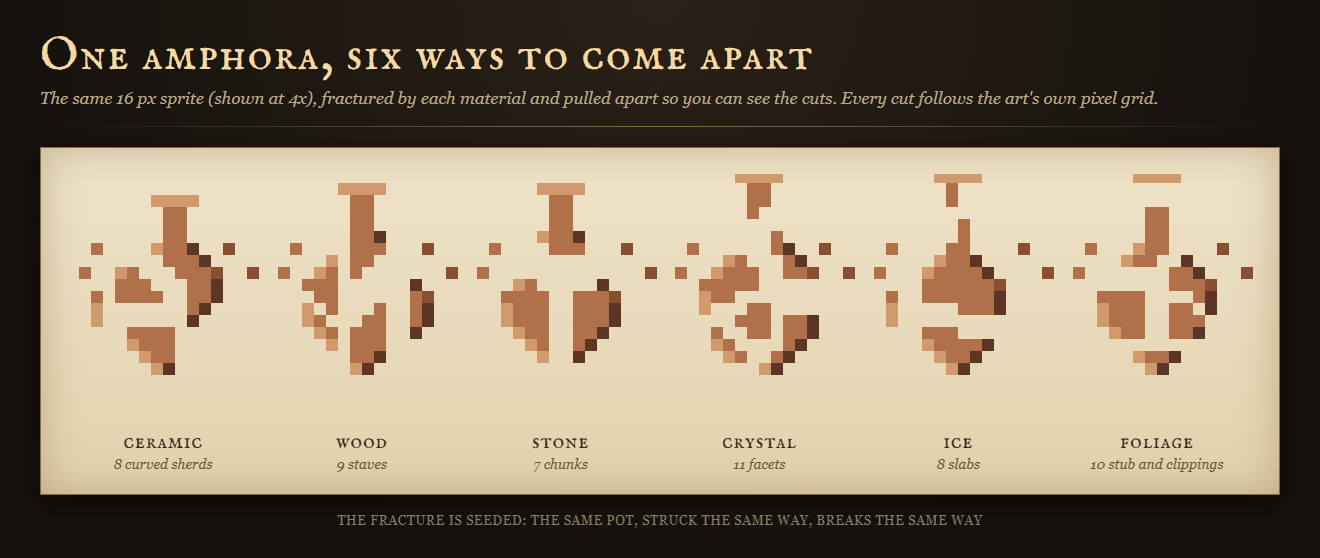
If your art is drawn at 2x, 3x or 4x, a 16 px tile shown at 48 px for example, Smithereens detects that and breaks along the art's own pixel grid, so no fragment ever cuts an art pixel in half. The fragment atlas is sampled nearest-neighbour and every piece is placed on whole pixels, so nothing is blurred and no neighbouring piece bleeds in at the edges.
It is built to hold a frame rate
Fragments come from a fixed pool made once per map and every break is baked into one shared texture, so the scene's object count does not grow and the per-frame update allocates nothing. Each breakable graphic on a map is read once while the map settles, so a strike never stops to read its artwork: breaking an object performs no pixel reads at all, which is asserted in the engine rather than hoped for. At most one object is cut in one frame; a bomb in a room full of pots breaks the rest over the following frames, still whole until their turn, which reads as a chain reaction rather than one long frame. Measured in the real engine with the engine stepped frame by frame, as frame costs and never as a frame rate: with 24 objects bursting at once every second, the plugin's own update averaged 0.65 ms with 10 draw calls per frame and no growth in the scene's object count.
What you get
Smithereens.js,SmithereensCore.js,SmithereensCut.js: raw, readable, commented JavaScript. Nothing minified. The load order does not matter.- 6 parameters (fragments on screen, debris lifetime, materials by terrain tag and by region, how a broken object persists, node shake) and three plugin commands (Smash event, Smash in front of player, Clear debris).
- A script call for action battle systems and gathering plugins:
CSAF.Smithereens.smash(eventId, { dirX: 1, dirY: 0 }), so whatever detects your hits can pass one on, with the direction of the blow. - A Readme covering every parameter, command, note tag and material, and the licence: unlimited games, commercial or free, no royalties.
Honest about what it is not
- It draws breaks, it does not detect hits. Your action battle system, gathering plugin or event decides when something is struck; Smithereens does the rest. Plain event commands work with no other plugin at all.
- It breaks events, not tiles. An object drawn straight onto the map as a tile is part of MZ's batched tilemap; put it on an event, which is how MZ's own sample maps place breakables anyway.
- Fragments are scenery. They never block, collide with or trigger anything.
- Where each fragment lies is not saved: debris belongs to the visit. What a node has suffered and when it regrows is saved.
- The tiles and props in these images are demonstration art from our Verdant 01 - Overworld tileset and are not included. Smithereens cuts whatever art your project uses.
- Made with AI assistance: the code and the graphics. No sounds and no story text ship with it.
Also from Core Systems Asset Factory
- Glaze: every pot, jar and bottle in your database draws its own glazed vessel.
- Patina: every weapon and tool wears, chips and tarnishes with use.
- Herbarium: every herb, root and fungus draws its own botanical plate.
- Elemental Surfaces: fire, ice and water leave marks on the map that spread and fade.
- Vivarium: the small life of every map, drawn at runtime.
Purchase
In order to download this asset pack you must purchase it at or above the minimum price of $9.99 USD. You will get access to the following files:
Development log
Leave a comment
Log in with itch.io to leave a comment.