CoreRedirect Forge for Unreal Engine 5
A downloadable tool
Rename a UPROPERTY and Unreal does not error. It just loses the data.
Health becomes Vitality. It compiles. The editor opens. Nothing warns you. Every asset that stored a value for Health now has a Vitality holding whatever the constructor puts there, and the old value is not recoverable by any later tool.
Epic states the consequence in its own documentation for this feature:
"simply renaming the code member and recompiling your project will cause considerable data loss, because Unreal Engine will no longer recognize existing Assets"
The remedy Epic names is a [CoreRedirects] block in DefaultEngine.ini, written by hand. That mechanism works. The difficulty is that writing the block requires knowing what the names used to be — and by the time you need it, they are gone. The compiler has the new ones. Your assets have the old ones. Nothing in the editor holds both.
Epic's own engineers hit this constantly, and solve it the same way you would: 133 plugins shipped with Unreal Engine 5.8 carry a hand-maintained [CoreRedirects] section — Niagara, Control Rig, GameplayAbilities, MetaSound, PCG, Enhanced Input, Paper2D and 126 more. Every one of those entries was typed by a human who remembered what the name used to be. Nothing in the editor generates one.
Measured, on real assets
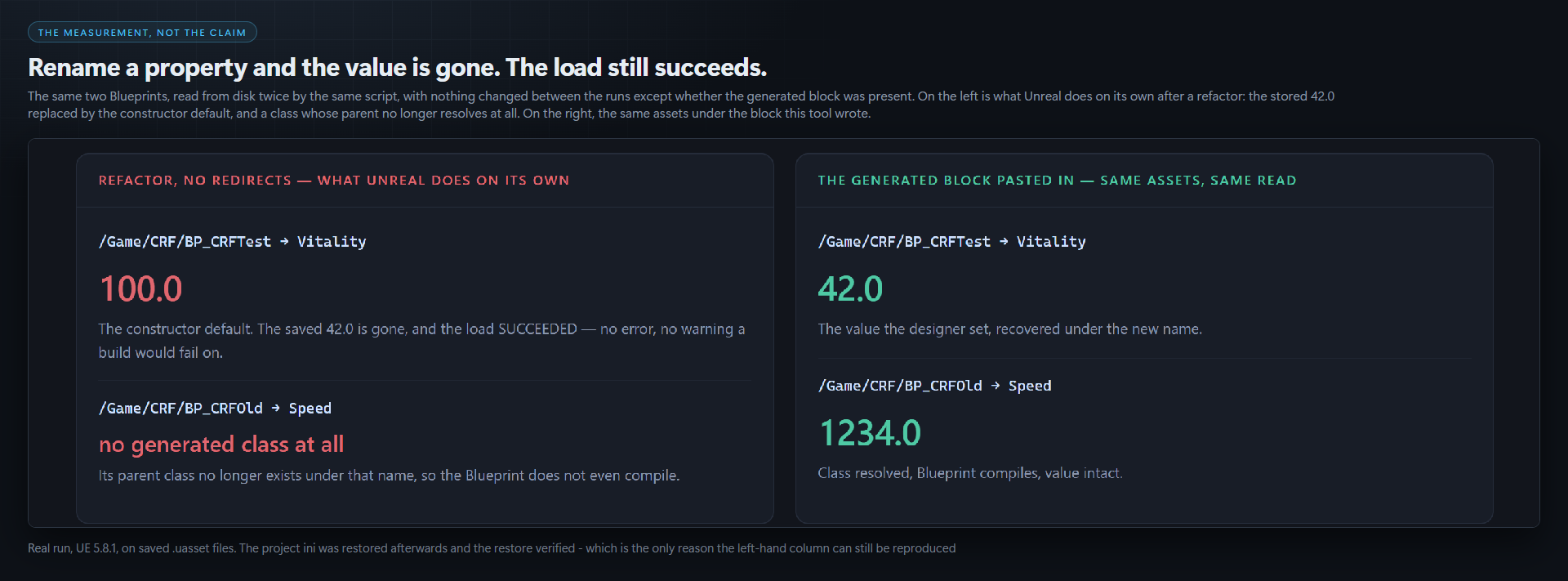
A Blueprint saved 42.0 against a property called Health. Another saved 1234.0 against a class called ACRFOldName. Then the C++ was refactored and both assets were read back from disk, twice, by the same script.
| Refactor, no redirects | The generated block pasted in |
|---|---|
BP_CRFTest → 100.0 — the constructor default. The saved 42.0 is gone, and the load succeeded. | BP_CRFTest → 42.0 |
BP_CRFOld → no generated class at all. Its parent no longer exists under that name, so the Blueprint does not even compile. | BP_CRFOld → 1234.0 |
Nothing changed between those two readings except whether the block this tool wrote was present.
The mistake almost everyone makes writing one by hand
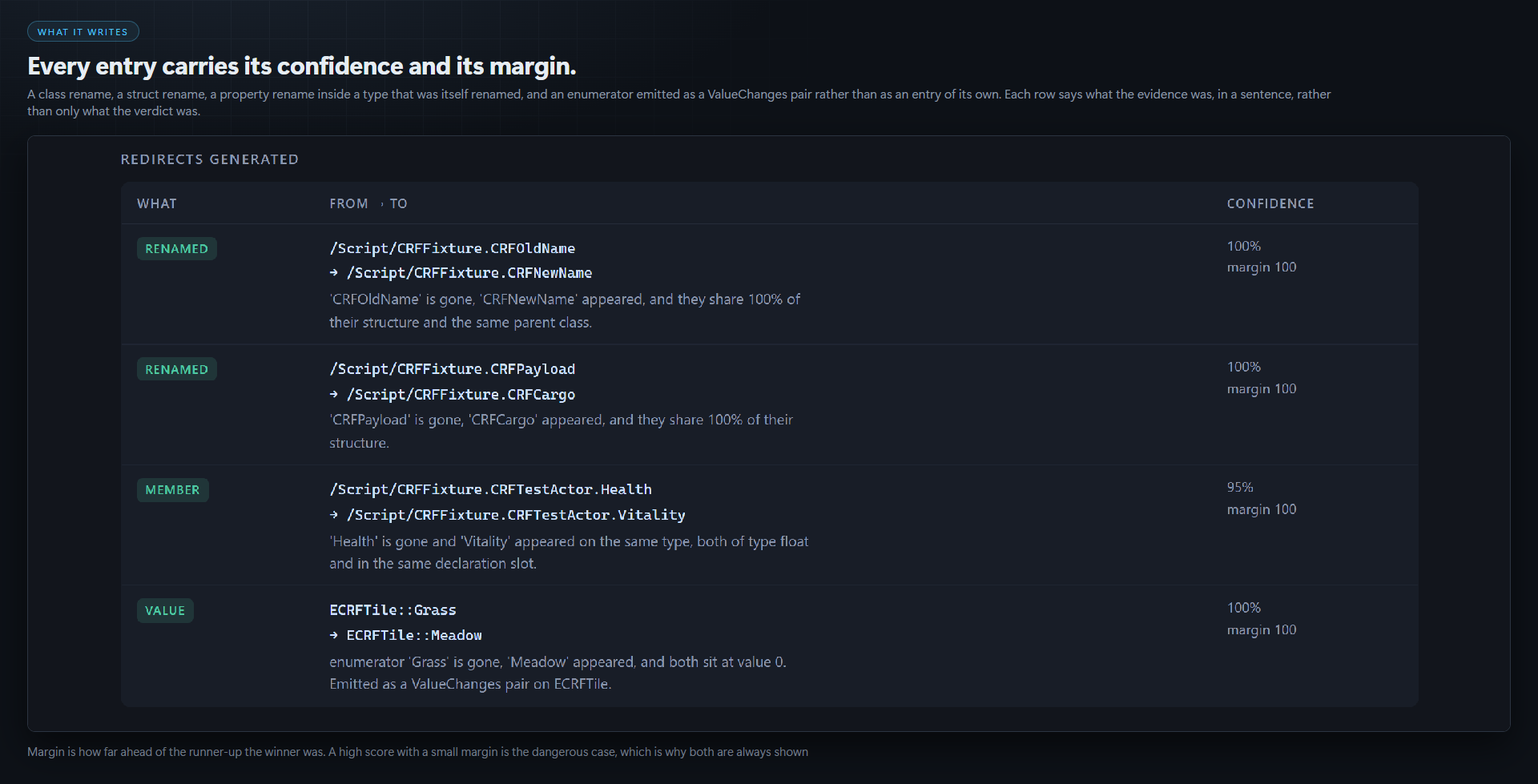
A redirect entry names the reflected type, and that is not the name in your header. UHT strips the leading A or U when it registers a class, exactly as AActor itself is registered /Script/Engine.Actor.
class AMyActor→/Script/MyGame.MyActorstruct FMyPayload→/Script/MyGame.MyPayloadenum class EMyTile→/Script/MyGame.EMyTile— theEis kept
Type AMyActor and the engine drops the entry with one line at startup. The file looks right, parses, and does nothing. This tool cannot make that mistake, because it never parses a header — it reads GetPathName() off the live UClass.
Snapshot first. That is the whole trick.
UnrealEditor-Cmd.exe Project.uproject -run=CoreRedirectForge
    -Snapshot="Saved/CRF/before.json" -Apply -unattended -nosplash
That captures your modules' reflection surface while it is still correct: every class, struct, enum, property, function and enumerator, with its parent class, its C++ type and its declaration order. Commit that file. It is the only record of the names you are about to destroy.
Then rename, move, delete and recompile however you like. Capture again, and diff:
... -Before="Saved/CRF/before.json" -After="Saved/CRF/after.json"
    -Out="Saved/CRF/redirects.ini" -Report="Saved/CRF/report.html" -Apply -Verify
It refuses far more readily than it guesses
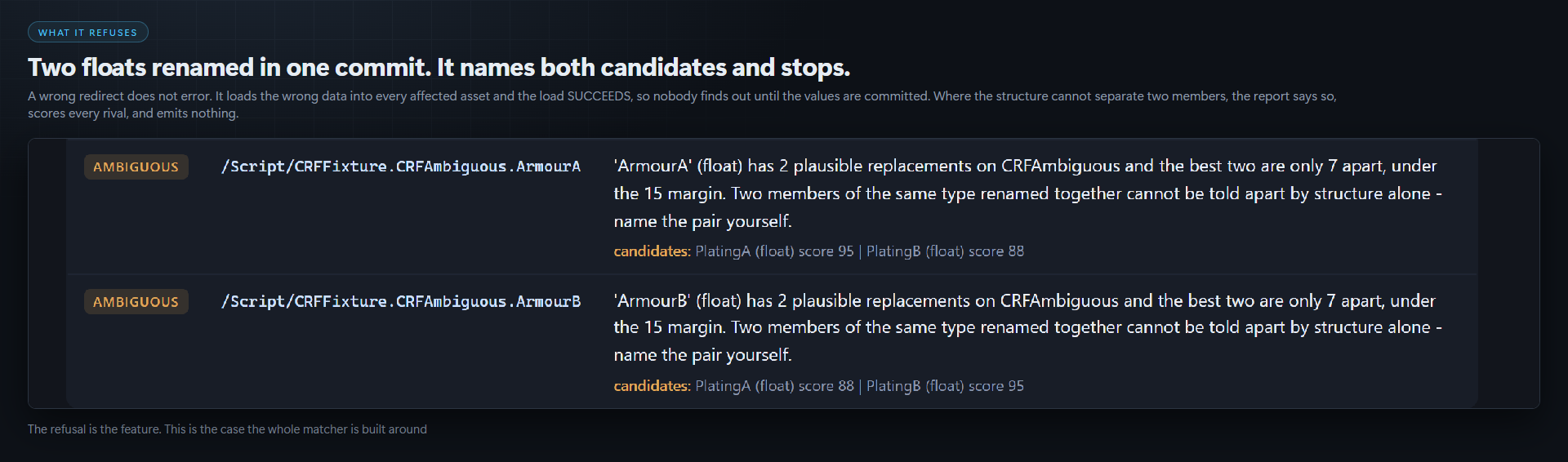
A wrong redirect does not error. It loads the wrong data into every affected asset, and the load succeeds — so nobody finds out until the values are committed. That asymmetry drives the whole design.
Types are matched by path first, so a project where nothing was renamed produces no findings at all whatever the thresholds say. What is left over is matched by structure within the same kind — a class is never matched to a struct — and a winner must clear a confidence floor and beat the runner-up by a margin. Failing either is reported as ambiguous, with every rival named and scored, rather than resolved by best guess.
- Two floats renamed in one commit are refused by name. Nothing in the structure distinguishes them, and a guess would swap two gameplay values across every asset in the project, silently.
- A member that vanished with nothing plausible in its place is reported as removed, with no invented target. The engine does support a
Removed=trueentry, but that is a statement about your intent. - Every emitted entry carries its confidence AND its margin, because a high score with a small margin is the dangerous case.
- Two snapshots taken over different
-Packagessets are refused — every type the second run did not look at would read as deleted.
-Verify turns the claim into a measurement
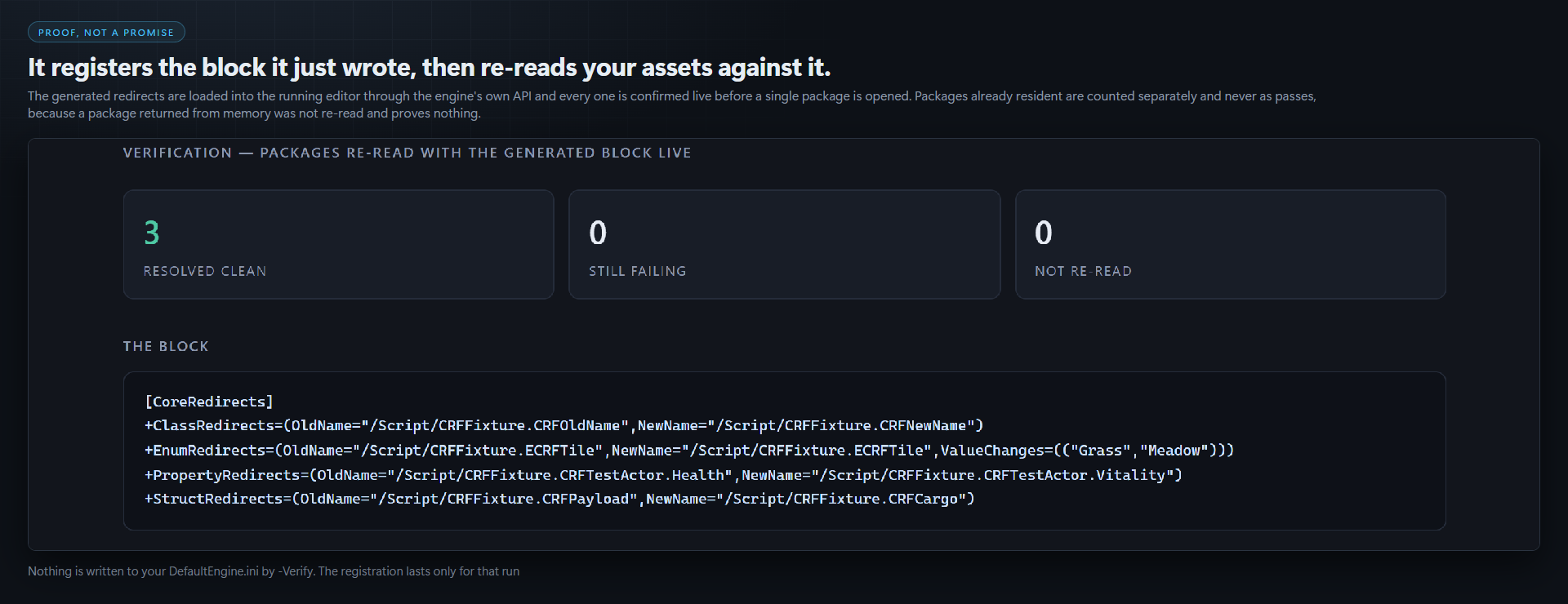
It registers the block it just generated in the running editor through the engine's own API, reads every entry back to confirm it is live before opening a single package, then loads every package the asset registry reports as depending on the affected code modules and counts what still fails to resolve.
Discovery is a dependency-graph query, so nothing is loaded in order to decide what to load. Packages already resident in the editor are counted separately and never as passes, because a package returned from memory was not re-read and proves nothing.
Nothing is written to your DefaultEngine.ini by -Verify. The registration lasts only for that run and is removed when it ends.
It never writes a .uasset
Not under -Apply, not under -Verify, not ever. The whole job is to produce a text block you read, review and paste. It writes three files, all to paths you name yourself: the JSON manifest, the ini fragment and the HTML report. Without -Apply every mode is a preview and none of them is written. There is consequently nothing to undo.
Six exit codes, and one caveat stated plainly
0 Ok · 1 BadArguments · 2 NothingFound · 3 UnresolvedChanges · 4 VerificationFailed · 5 IoError. Two identical manifests return NothingFound, not Ok, so a build step cannot pass by comparing a thing to itself.
Gate CI on the commandlet, not on the editor console command. On the console path a headless editor does not surface the requested code as the process exit code — it always exits 0, whatever the tool asks for. That is engine behaviour rather than a defect here, and it is worth knowing before you write the YAML. The tool logs its code on that path so you can read it from the log.
The report
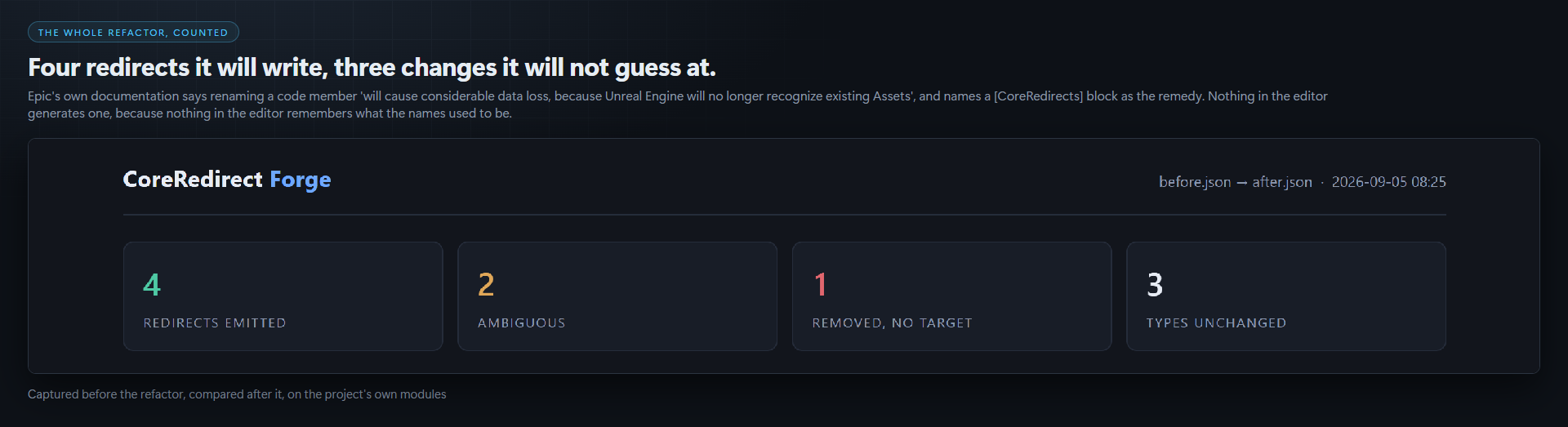
Every run writes a designed HTML sheet: the counts, every generated entry with its evidence in a sentence, every refusal with its rivals scored, the verification result, and the block itself. Absolute paths given on the command line are reduced to their filename before they reach the page, so a screenshot of it carries nothing about your machine.
If you also have Migration Ledger
They generate the same kind of block from opposite ends. Migration Ledger reads the engine's deprecation database and answers "Epic renamed something under me during an engine upgrade". This reads two snapshots of your own reflection surface and answers "I renamed something, and my assets still hold the old name". Nothing in the engine records the second, which is why this tool has to capture the surface itself, before the fact. Run Migration Ledger when you change engine version; run this when you refactor.
Compatibility
Unreal Engine 5.8, Windows 64-bit. Editor-only plugin, full C++ source included, no content. It adds no runtime code and nothing ships in your packaged game. No other engine version has been tested, so no other version is claimed.
Purchase
In order to download this tool you must purchase it at or above the minimum price of $14.99 USD. You will get access to the following files:
Development log
Leave a comment
Log in with itch.io to leave a comment.